
The free Markup.io alternative your clients will actually use
An honest, side-by-side look at Comnview vs Markup.io in 2026: pricing, the client experience, PDFs, websites and team workflow, with screenshots of both.
By the Comnview team · Updated · 12 min read
Table of contents8 sections
TL;DR: the same pins, a very different bill
Both tools pin comments to the exact spot, and on the same review they look almost identical. Comnview wins on price and simplicity: a free plan with no card, paid plans from $9 a month instead of $79, guests who comment with just a name, websites captured from a pasted link (localhost too, with the extension) and new versions that replace a single page. Markup.io wins on breadth: video and Office files, unlimited users, statuses and sign-off, and Slack, Microsoft Teams and Zapier.
Pick Comnview if
- You want to review for free with no card, or pay a fraction of the price: $9 to $19 a month instead of $79 and up.
- Your reviews are images, PDFs, design exports or websites: paste a link, or capture localhost and staging deployments with the Chrome extension.
- You are a freelancer or a small team (up to 5 people on Pro).
- You want guests to comment with just a name, no email required.
Stay with Markup.io if
- You review video, Word or PowerPoint files, or Photoshop and Illustrator files.
- You rely on Slack, Microsoft Teams or Zapier, or on statuses, pin priority and sign-off.
- You need unlimited users on one plan.
- You create fewer than 50 new reviews a month and the $79 price is not an issue.
Disclosure: We make Comnview, so read this knowing we are biased. We tested Markup.io on its own 14-day trial (it asked for a card), ran the same files and comments through both tools, and every Markup.io fact links to its source below. Spotted something out of date? Write to support@comnview.com and we will fix it.
Comnview vs Markup.io at a glance
Built for freelancers and small studios who watch their budget: the features that matter are on the free plan.
A tick marks the stronger side on that row; rows without a tick are a tie or a matter of taste. The Comnview column is tinted because this is our page.
Markup.io facts checked on 1 October 2026 against markup.io and its help center; each row links to its source. “Not documented” means we could not find it in their docs, not that it is impossible. Rows marked “our test” come from our own trial account.
What it really costs: $0 against $948 a year
Markup.io removed its free plan in early 2025, and reviewers report Pro going from $29 to $79 a month. Even the 14-day trial now asks for a credit card. In mid-2026 it moved to an allowance: Pro includes 50, 75 or 100 new MarkUps a month ($79, $99 or $129), Business 200 to 600 ($499 to $799).
Every new MarkUp counts, whether it comes from an upload, a URL or the Chrome extension. Deleting one does not give it back, the allowance does not roll over, and extra MarkUps cost $4 each in packs of 10. Users are unlimited on every plan, which is a real advantage for big teams.
Comnview counts projects you keep, not projects you create. Uploads, PDFs and website captures share one pool: Free covers 3 projects, Starter 50, Pro and Business are unlimited within fair use. Delete an old project and the slot is yours again.
Sources: Markup.io pricing, Help: understanding your MarkUp allowance, Markup.io pricing FAQ.
Comnview can be infinitely cheaper
The free plan costs nothing, and the paid plans typically come out four to nine times cheaper than Markup.io. Here is the yearly bill for three typical teams.
| Who | Comnview | Markup.io |
|---|---|---|
| Freelancer, 1 person, about 5 new reviews a month | $0 to $108 (Free or Starter) | $948 (Pro 50, monthly only) |
| Small studio, 3 people, about 30 reviews a month | $228 (Pro, up to 5 people) | $948 (Pro 50, monthly only) |
| Agency, 10 people, about 150 reviews a month | Business, priced for your team | $4,990 (Business 200, yearly) |
Comnview prices are the yearly rates on comnview.com/pricing. Markup.io’s 50-MarkUp Pro tier has no yearly option; its yearly prices start at $990 for 75 MarkUps a month. See Comnview pricing.
Before you switch: One condition: Comnview has to do what you need. If you rely on something only Markup.io offers, such as video review, Office files or Slack, the savings will not help you. Check where Markup.io is the better choice before you switch. Where Markup.io is better
Side by side, task by task
The same jobs in both tools, with screenshots we took ourselves.
1. Starting a review: no card, no account
Both tools turn a file into a review link in a few seconds. The difference is what you need before you start.
Comnview
- Drop images or a PDF, or paste a website link, on the homepage. No account, no card.
- The link is ready right away, with an optional password and email notifications.
- Create a free account later to keep projects on every device.
Markup.io
- You need an account and a credit card, even for the 14-day trial.
- Paste a URL or upload files; several files can be combined into one MarkUp.
- Each new MarkUp uses one from your monthly allowance.
Sources: Markup.io pricing FAQ, Help: understanding your MarkUp allowance
VerdictComnview gets you to a shareable link with less in the way; Markup.io takes more file types.
2. What your client sees: one field less to fill in
This is where feedback tools win or lose: if the client gives up, nothing else matters.
Comnview
- The client opens the link in any browser and types a name once.
- Email is optional and only used for reply notifications.
- On a phone, comments open as sheets and press and hold places a pin.
Markup.io
- Guests comment without creating an account.
- They are asked for a name and an email address first.
- Guests can be invited by email or reach the MarkUp through a share link.
Sources: Help: guest users, Help: sharing a MarkUp
VerdictBoth are account-free for clients. Comnview asks for one field less.
4. Images and PDFs: pins and drawing on every page
If your work is images and PDFs, both tools cover it. Beyond that, Markup.io takes many more formats.
Comnview
- PNG, JPG and WebP up to 10 MB, several images in one link.
- PDFs up to 64 MB and 100 pages, with pins and drawing on every page.
- Free shows 10 slides or PDF pages per project; Starter 50; Pro 100.
Markup.io
- More than 30 formats: PDF, images including SVG, GIF, PSD and AI, Word and PowerPoint, and video.
- Frame-accurate comments on video.
- No Figma files; Markup.io suggests exporting to PDF.
Sources: Help: what file types can I upload, Help: can I upload a Figma file
VerdictFor video and Office files, Markup.io is the better tool. For images and PDFs, both do the job.
5. Websites: localhost too, with nothing to deploy
Both tools now take a pasted URL. The difference is what you get back: Markup.io loads the live site through its own servers, while Comnview captures a snapshot of the page, so the client reviews exactly what you sent.
Comnview
- Paste a link on the homepage and Comnview captures the live page: a full-page screenshot plus a copy the client can scroll.
- A link straight to an image or PDF becomes an image or PDF project.
- Free includes 3 website captures to try; Starter and up are unlimited.
- Localhost, staging or password-protected? The Chrome extension captures them in your browser, with nothing to deploy, on every plan.
Markup.io
- Paste a URL and Markup.io loads the live site through its proxy, in desktop, tablet and mobile views.
- Password-protected sites are supported but “may behave differently”; the Chrome extension often helps.
- Sites behind bot protection may need Markup’s IP addresses allowed. In our test, http://localhost:3000 was rejected as an invalid URL.
- Because the page is live, a pin can lose its spot when the page changes. In our test, a comment on an animated headline became “pinned to a hidden element”.
Sources: Help: how do I whitelist MarkUp, Help: can I mark up a password-protected website, Help: different media types, Help: why are my comments or pins missing
VerdictBoth take a pasted URL. Markup.io shows the site live; Comnview freezes a snapshot so feedback matches what you sent, and its extension also captures localhost, so nothing has to be deployed first.
7. Versions: replace a single page, comments stay put
Most projects need more than one round. Both tools keep earlier versions.
Comnview
- Pro: upload a new version of the whole file, or replace one page or one slide.
- Up to 20 versions per project; older ones stay viewable.
- Versions already made stay viewable after a downgrade.
Markup.io
- Upload a new version of an image or PDF MarkUp.
- Older versions can be shown alongside the new one.
- Not available for video or web page MarkUps.
VerdictSimilar for images and PDFs. Comnview can swap a single PDF page; Markup.io works on the whole file.
8. Teams and integrations: a team of five for $19 a month
This is where Markup.io’s higher price buys real extras, especially for larger organisations.
Comnview
- Pro: a team workspace for up to 5 people, export of comments as a PDF report or CSV.
- Email notifications, grouped so nobody gets one email per comment.
Markup.io
- Unlimited users on every plan, with Owner, Admin, Member and Guest roles.
- Slack, Microsoft Teams, Loom and Zapier, plus an API and SDK.
Sources: Markup.io pricing FAQ, Markup help center
VerdictIf you need integrations or many users on one plan, Markup.io is ahead today.
What Markup.io users say
Markup.io has a 4.6 out of 5 rating on G2 (35 reviews) and 4.4 on Capterra (11 reviews). On Trustpilot it scores 3.6 from 147 reviews, and most recent 1-star reviews are about the 2025 price change.
What they like
- Clients find it easy: reviewers say it takes seconds to understand.
- It replaces feedback in emails and Word documents.
- Share links are quick to create and send.
What they complain about
- Price: the end of the free plan and the jump to $79 a month, with no grandfathering for existing users.
- Reliability: some reviewers mention glitches or pages that do not load.
- Pins that move or disappear when a site’s URL changes, which Markup.io’s own help center explains.
Ratings checked 1 October 2026: G2 reviews, Capterra reviews, Trustpilot reviews, Help: why are my comments or pins missing.
Where Markup.io is the better choice
- Video review with frame-accurate comments.
- Word, PowerPoint, Photoshop and Illustrator files without exporting first.
- Slack, Microsoft Teams and Zapier integrations, an API and an SDK.
- Unlimited users on every plan, for larger organisations.
If several of these matter to you, Markup.io is worth the price. If they do not, you are paying for things you will not use.
Moving from Markup.io takes a few minutes
- 1
Export and upload
Download the images or PDFs from your open MarkUps and drop them on Comnview.
- 2
Share one link
Send the new link to your client. Nobody needs an account to open it.
- 3
Collect pinned feedback
Clients pin comments on the exact spot; you reply and resolve in place.
Frequently asked questions
Can I import my projects from Markup.io?
There is no importer. Download the images or PDFs you were reviewing and upload them to Comnview; it takes a few seconds per file, and your client gets a new link. Old comments stay in Markup.io, where owners and admins can export them as CSV.
Is Comnview really free?
Yes. The free plan covers 3 projects with up to 10 images or PDF pages and 10 comments each, 3 website captures to try, password links, and links that never expire. Starter is $9 a month billed yearly for 50 projects and unlimited comments.
Does Markup.io still have a free plan?
No. Markup.io removed its free plan in early 2025. It offers a 14-day trial, and when we signed up on 1 October 2026 it asked for a credit card before the trial started.
Do clients need an account to comment?
Not in either tool. Comnview asks a guest for a name once; Markup.io asks for a name and an email address.
Can Comnview review videos or Word files?
No. Comnview handles images, PDFs and web pages captured with its Chrome extension. For video or Office files, Markup.io is the better fit.
Can I just paste a website link?
Yes. Paste a link on the Comnview homepage and it captures the live page for review, no extension needed. Free accounts and visitors get 3 captures to try; Starter and up are unlimited. Links to images or PDFs are stored as image or PDF projects.
Does it work on localhost?
Yes. The Comnview Chrome extension captures any page you can open in Chrome, including localhost and staging, so nothing has to be deployed. Markup.io loads sites through its own servers, and in our test it rejected a localhost address as an invalid URL.
Is my data private?
Only people with the link can open a preview, previews are never indexed by search engines, and you can add a password on any plan. We do not sell your data or use your content to train AI models.
All sources (21), checked 1 October 2026
- Markup.io pricing
- Markup.io pricing FAQ
- Help: understanding your MarkUp allowance
- Help: guest users
- Help: what file types can I upload
- Markup.io blog: how to draw on videos
- Help: different media types
- Help: can I upload a Figma file
- Help: how do I whitelist MarkUp
- Help: can I mark up a password-protected website
- Help: statuses and sign-off
- Help: pin priority
- Help: exporting MarkUp comments
- Help: can I upload a new version of my MarkUp
- Markup help center
- Help: sharing a MarkUp
- Help: why are my comments or pins missing
- MarkUp for Chrome on the Chrome Web Store
- G2 reviews
- Capterra reviews
- Trustpilot reviews
Markup.io is a trademark of its owner, Ceros, Inc. Comnview is not affiliated with it. Screenshots of both apps were taken by us.
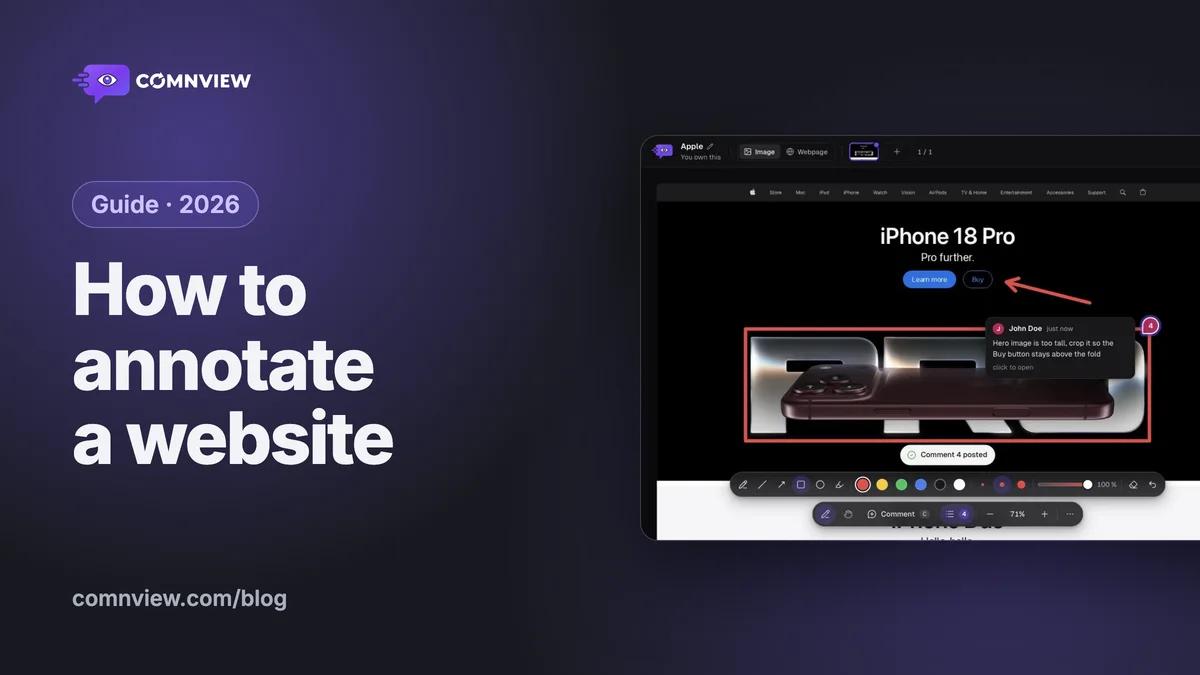
3. Pins, replies and drawing: simple by design
Both tools pin a comment to the exact spot, thread replies and let you resolve them.
Comnview
Markup.io
Sources: Markup.io blog: how to draw on videos, Help: statuses and sign-off, Help: pin priority
VerdictMarkup.io has more workflow on top of comments (statuses, priority, sign-off). Comnview keeps it to pins, replies, drawing and resolve.